AI Agents in the Field: How Service Companies Are Using Agentforce to Close the Last-Mile Communication Gap
- Ohana Focus Team

- May 21
- 9 min read
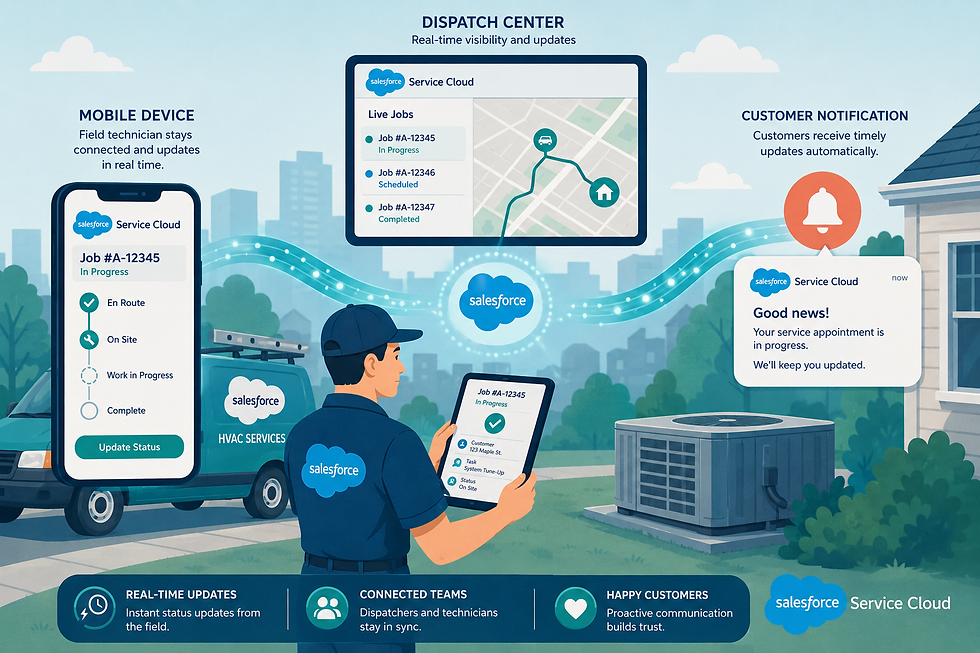
The work order is complete. The technician snapped photos, got the customer's signature, and is on to the next job. But back at the office, the dispatcher still doesn't know the job is done—because the technician hasn't had a moment to call in. The customer is waiting for a follow-up email that won't arrive until tomorrow morning when someone manually checks the completed jobs queue. Meanwhile, a parts request from that same job sits in a group text, unseen.
This is the last-mile communication gap: the persistent breakdown between what happens in the field and what the rest of the organization knows, acts on, or communicates to customers. It's not a technology failure, exactly—most field service companies already have scheduling software, a CRM, and some version of mobile apps for technicians. The gap isn't about missing tools. It's about the friction between those tools and the real-time, human coordination that field operations demand.
Salesforce Agentforce is changing this dynamic in a meaningful way. By deploying AI agents that can observe, communicate, and act autonomously—within defined boundaries—service companies are discovering that the last mile doesn't have to be a communication black hole. This post explores how that's happening, what the results look like across industries, and what organizations should realistically expect from an Agentforce deployment.
What Is the Last-Mile Communication Gap, Really?

In logistics, the 'last mile' refers to the final leg of delivery—often the most expensive and least efficient part of the journey. In field service, the concept is analogous but applies to information: the handoff between the moment work is performed and the moment every relevant stakeholder—dispatcher, customer, billing team, inventory manager—knows about it and can respond. The gap shows up in predictable ways:
Customers are calling to check on technician arrival times because automated notifications weren't triggered
Office staff manually enter job completion notes hours after the fact
Billing delays because technicians didn't submit paperwork until the following morning
Parts shortages are discovered only when a technician arrives on-site
Supervisors are unaware of job complications until a customer calls to complain
None of these issues is unique to any one company. They're structural features of how field service has historically worked: the field is where the action is, and the office is where the information lives. Bridging those two realities has always required human effort—phone calls, data entry, follow-up emails—and human effort introduces delays, errors, and inconsistency.
Agentforce doesn't eliminate the need for human judgment in field operations. But it dramatically reduces the manual coordination burden by handling the communication layer automatically, in real time, based on what's actually happening in Salesforce.
How Agentforce Works in a Field Service Context

Agentforce is Salesforce's AI agent platform, built on top of the Einstein AI layer and deeply integrated with Salesforce Field Service (formerly Field Service Lightning). Rather than requiring staff to trigger actions manually, Agentforce agents can be configured to monitor data conditions and respond autonomously—sending notifications, updating records, routing requests, and escalating issues based on predefined logic and AI-powered reasoning.
A few key capabilities make this particularly valuable for field operations:
Autonomous Monitoring and Response
Agentforce agents can watch for specific conditions in Salesforce—a work order marked complete, a job status changing, a customer sentiment score dropping—and initiate appropriate responses without waiting for a human to notice and act. In a dispatch center handling 50 or 100 jobs per day, this eliminates an enormous amount of reactive work.
Natural Language Interactions
Field technicians aren't always in a position to navigate complex software interfaces. Agentforce supports natural language interactions, meaning a technician can describe a situation conversationally—via voice or a simple text interface—and the agent can interpret it, update the relevant records, and trigger downstream actions. This is a meaningful usability improvement over traditional mobile field service apps that require navigating structured menus.
Multi-Channel Communication

Agentforce agents can communicate across channels—SMS, email, in-app messaging, Slack—based on each recipient's preferences and context. A customer might receive an SMS when a technician is 20 minutes out; the dispatcher might receive a Slack notification when a high-priority job is delayed; the billing team might receive an automated email summary when a multi-day job wraps up.
Integration with Field Service Scheduling
Because Agentforce sits within the Salesforce ecosystem, it has direct access to scheduling data, technician locations (via mobile GPS), work order histories, and customer records. This isn't a bolt-on integration—it's the same data environment field service teams already use, now with an AI agent layer that can reason about it and act on it.
Industry Applications: Where the Gap Closes First

The last-mile communication challenge plays out differently across industries. Here's how Agentforce is addressing it across the service sectors we work with most often.
Construction and Specialty Contractors
Consider a hypothetical mid-size electrical contractor—call them Meridian Electrical Services—managing 35 technicians across commercial and residential projects. Before deploying Agentforce, their project coordinators spent roughly two hours each morning manually reconciling the previous day's completed work orders, updating billing records, and sending status emails to general contractors waiting on inspection reports.
After configuring Agentforce to monitor work order completions, the workflow shifted significantly. When a technician marks a job complete and uploads inspection photos via the mobile app, the Agentforce agent automatically verifies the required photo count, generates a completion summary, emails the general contractor with the summary and photos attached, and flags the work order for billing review. The coordinator's morning reconciliation dropped from two hours to under 30 minutes—not because the coordinator became faster, but because the routine, rule-based portion of the work was handled automatically overnight.
For construction companies managing multiple subcontractor relationships, Agentforce can also surface exceptions proactively: when a job runs over the scheduled time window, when a subcontractor hasn't checked in by a specified milestone, or when materials usage exceeds the estimated quantity. These aren't issues that necessarily require immediate human intervention—but they're exactly the kind of signals that get missed when coordinators are already at capacity.
Logistics and Last-Mile Delivery

In logistics, the last-mile communication problem is often a customer experience problem: people want to know where their delivery is, and they want to know immediately when something changes. Traditionally, this has required either expensive dedicated tracking infrastructure or manual communication from dispatchers who have dozens of other priorities.
Imagine a regional logistics company—call them Summit Distribution—handling B2B deliveries across a multi-county area. Their dispatchers were fielding 30 to 40 inbound calls per day from customers asking for ETAs and delivery confirmations. After implementing Agentforce with proactive customer communication workflows, the dynamic changed considerably. As drivers update their status through the Salesforce mobile app, Agentforce agents automatically send SMS updates to customers at defined milestones: when the driver departs the distribution center, when they're 30 minutes out, and when the delivery is completed with a photo of the signed receipt.
The result was a significant reduction in inbound call volume—and a corresponding increase in dispatcher capacity to handle actual exceptions rather than routine status inquiries. Summit Distribution also configured Agentforce to flag potential delivery issues: when a driver's GPS location indicates they're significantly behind schedule, the agent proactively notifies the customer and offers to reschedule, without waiting for a dispatcher to notice the delay.
HVAC, Plumbing, and Home Services
Home services companies face a specific version of the last-mile gap: customers at home, waiting for technicians, with limited visibility into when they'll actually arrive. The frustration this creates is well-documented—and it directly affects review scores and repeat business.
A hypothetical HVAC company, Clearview Climate Solutions, deployed Agentforce primarily to address customer communication during peak season, when their dispatch team was consistently overwhelmed. The configuration was relatively straightforward: when a technician's job status and GPS location indicate they're en route to the next appointment, Agentforce sends the customer a personalized text with the technician's first name, an estimated arrival window, and a link to a live tracking view. On job completion, a follow-up text with a satisfaction survey link goes out automatically.
What Clearview discovered was that the reduction in 'where is my technician?' calls freed dispatchers to handle the higher-value work of managing complex scheduling exceptions—emergency calls, equipment availability issues, technician routing changes—that genuinely required human judgment. The AI handled the routine; the humans focused on the unusual.
The Honest Assessment

We believe in being straightforward about what technology can and can't do. Agentforce is genuinely powerful for field service communication—but it's not a universal solution, and implementations that ignore its limitations tend to create new problems.
Where Agentforce Excels
High-volume, rule-based communication: When the same message needs to go to many different recipients based on predictable triggers, Agentforce is highly effective and frees human staff from repetitive work.
Real-time data synchronization: Because it operates within Salesforce, Agentforce has immediate access to field data as it's entered, without integration delays or data transformation steps.
Exception surfacing: Agentforce is well-suited to monitoring large volumes of jobs and flagging the ones that deviate from expectations—before a customer calls to report a problem.
Technician support: Natural language interfaces reduce the friction of field data entry, improving data quality and reducing the time technicians spend on administrative tasks.
Where Human Judgment Remains Essential
Complex customer escalations: When a customer is upset or a situation involves nuanced relationship management, AI agents aren't the right tool. Agentforce should hand these off quickly and cleanly.
Non-standard situations: Agentforce performs best when field situations match the patterns it's been configured to handle. Genuinely novel scenarios—unusual site conditions, major equipment failures, safety incidents—require human dispatch.
Initial configuration quality: The automation is only as good as the rules and data behind it. Poor Salesforce data hygiene, incomplete work order records, or inconsistent technician app usage will degrade agent performance.
A Note on Data Readiness

Organizations considering Agentforce for field operations should honestly assess the quality and completeness of their Salesforce data before deployment. Agentforce agents act on the data they can see. If work order records are frequently incomplete, technician statuses are inconsistently updated, or customer contact information is outdated, the agents will send wrong messages at wrong times—sometimes to the wrong people. A data readiness review is an essential first step in any Agentforce implementation.
What Implementation Actually Looks Like

For service companies evaluating Agentforce, the implementation path matters as much as the technology itself. A few realities worth understanding before committing:
Start With One Workflow
The most successful Agentforce deployments we've seen in field service start with a single, high-value workflow—typically customer arrival notifications or job completion confirmations—rather than attempting to automate the entire communication stack at once. This approach delivers quick wins, builds organizational confidence in AI-driven communication, and surfaces data quality issues in a contained environment before they affect more complex automations.
Involve Technicians Early
Agentforce's effectiveness in field service depends heavily on technicians using the Salesforce mobile app consistently and accurately. If status updates are sporadic or incomplete, the agents have nothing reliable to act on. Organizations that invest in technician training and mobile UX optimization before or alongside Agentforce deployment see substantially better outcomes than those that treat field adoption as an afterthought.
Define the Escalation Path
Every Agentforce workflow should have a clearly defined point at which the agent hands off to a human. This isn't a failure condition—it's good design. Customers and field staff should know when they're interacting with an automated agent versus a person, and escalation paths should be fast and obvious. The goal is to keep humans in the loop for the situations that genuinely require them, not to minimize human involvement as a goal in itself.
Timeline and Investment
A focused Agentforce deployment for field service communication—covering arrival notifications, job completion workflows, and basic exception alerting—typically takes between six and twelve weeks, depending on the complexity of existing Salesforce configuration, data quality, and the number of communication channels being integrated. Organizations with well-maintained Salesforce instances and strong field app adoption can move faster. Those starting from a lower baseline should plan accordingly.
Practical Next Steps for Field Service Leaders

If your organization is evaluating Agentforce for field operations, here's a grounded starting framework:
Map your current communication gaps. Identify the three to five points in your field workflow where information consistently fails to reach the right person at the right time. These are your best candidates for initial Agentforce workflows.
Assess your Salesforce data quality. Pull a sample of recent work orders and evaluate completeness: are status fields consistently updated? Are customer contact records accurate? Is technician location data being captured? This assessment will shape your implementation timeline.
Identify your highest-volume, lowest-judgment communication tasks. These are the tasks where Agentforce delivers the clearest ROI—the messages your dispatchers send 40 times a day that follow the same template every time.
Talk to your field staff. The technicians and drivers who use Salesforce in the field every day have direct insight into where the communication process breaks down. Their input should inform both the workflow design and the mobile adoption strategy.
Plan for change management. Deploying AI agents in field operations changes how dispatchers, coordinators, and field staff interact with information. Organizations that invest in change management alongside technical implementation see higher adoption and faster ROI.
Partner with Ohana Focus

About Ohana Focus
Ohana Focus is a certified Salesforce consulting partner dedicated to helping organizations harness the full power of the Salesforce platform—including Agentforce AI automation. We serve nonprofits, financial services firms, wealth management practices, and service-based businesses across construction, logistics, and field services. Our team combines deep technical expertise with real-world industry knowledge. We don’t just configure software—we help organizations reimagine how work gets done. Whether you’re evaluating Agentforce for the first time or looking to expand an existing deployment, we’ll meet you where you are.


Comments